Overview: Which approach for which automation task


This article gives you a short overview of which technical approach you can and should use for your automation task, depending on your circumstances.
The matrix below shows three technology clusters that you can use depending on the degree of automation (from manual to fully automated) and the level of domain expertise required (from standard vendor features to expert knowledge).
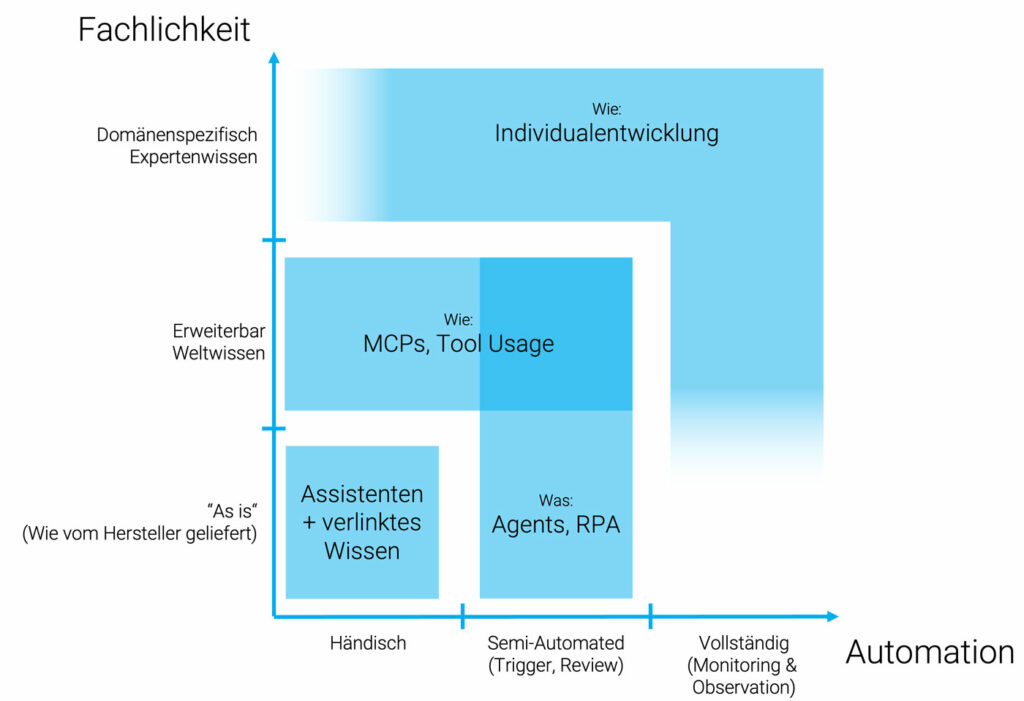
Quick start: assistants plus linked knowledge
What is behind it? You work with ChatGPT Desktop or Claude Desktop. Chat-based LLMs now come with an integrated vector database that you can load company data into, such as PDFs, wiki articles or tickets.
Typical use cases: "ask my project", quick summaries, research.
Maturity and effort: under 5 minutes to a proof of concept, and that proof of concept may already be good enough. No developers needed, but you work with what the vendor provides.
When to choose it? When you have ad hoc questions about large volumes of documents, or a lot of data has to be worked through, and domain depth or expert knowledge is secondary.
Powerful system integration: MCPs and tool usage
What is an MCP? At its core, the Model Context Protocol is a new API standard that gives LLMs structured access to third-party systems. Depending on the LLM vendor, there are comparable connections that are called function calling or tool usage instead of MCP.
Typical use cases: an example. You want to issue an invoice at the end of the month? Via MCP, the assistant pulls your employees' time entries from the ERP and creates a draft invoice. All you have to do is click OK. In short: whenever you want to integrate third-party systems and their data or functionality.
Maturity and effort: plan for 1 to 5 person-days for the MCP development in question, meaning the API connection. The more thought you put into robust parameters, plausibility checks and business context, the better the MCPs will work in day-to-day business. Iterative work and incremental improvement are very much possible.
When to choose it? To eliminate copy and paste tasks and manual handovers between several systems. When users should stay in the loop and in control, but the assistant should operate the various systems for you.
This can save a noticeable amount of effort, but always keep one thing in mind: a bad process that has been digitized is still a bad process. Ask yourself why process X is so complicated at the moment, and whether it has to be.
Acting autonomously: agents and RPA
What is an agent? An agent is an LLM with tool access that decides for itself which actions, tools or MCPs it uses, based on a task description. In RPA platforms (robotic process automation, examples include UiPath, Power Automate and Make), this is orchestrated as a graphical flow. One important point: RPA existed before AI, which means there are also RPA flows without any LLM integration.
Typical use cases: with this approach, execution moves to a central system and is therefore independent of the tools installed on users' machines. That makes agents and RPA particularly suitable for processes that are controlled and orchestrated centrally and that involve different user groups (a typical example is invoice approval by a manager, followed by accounting).
- No-code and low-code interfaces let departments adjust flows themselves. This becomes interesting when several different processes are to be automated using the same systems, for which you then only have to build the API, tool or MCP integration once. In that case the initial development effort of connecting the external systems in a no-code-friendly way pays off, because 50 percent of the project work often goes into authentication, roles and governance.
- Classic RPA needs clear IF → THEN decision paths. LLM agents can now also deliver processes that have to cope with messy data and greater variance in the input data. But here is our learning: the more freely and dynamically the agent has to act, the higher the risk that an individual process fails. So be careful with processes that are meant to run in high volumes.
When to choose it? For recurring, clearly defined workflows with several roles or systems involved.
Every option open: custom development
Custom development builds individual software solutions and delivers a solution tailored precisely to the use case. Standard LLMs can be used here, but fine-tuning or the complete development of neural networks (CNNs) built for the specific use case is also possible.
Typical use cases:
- Full automation and operation without manual intervention: if your automation has to run 24/7 and you process large volumes of data, custom development delivers the scalability you need. Away from individual processes and towards data pipelines. Combined with the right monitoring and alerting, you have an overview at all times. Example: annotation of news articles, more than 1 million entries per year.
- High domain complexity: if special cases occur frequently, if domain-specific expert knowledge has to be modeled and if processes and workflows are complex, custom development can deliver a solution cut to the specific domain. Example: analyzing key figures from tender documents and pre-calculating the most important metrics before an engineer takes the project design further.
When to choose it? When no standard tool can cover your volume, your compliance requirements or your domain logic.
Quick check: which approach fits your project?
If you would like to find out more about our AI services and approaches, click here.



Tech Newsletter
Join our 2,000+ subscribers and receive monthly updates on our latest articles, case studies, webinars, events, and industry news.