Headless WordPress: combining rich content with complex application logic

Some problems look quite simple at first glance, but then take quite a while before you find a good solution. Applications like headless WordPress require not only technical functionality but also far-reaching options for editing and designing content. Those should go beyond "simple" data entry forms and displaying what they contain.
In the blog post below we look at the advantages and disadvantages of WordPress when it comes to combining rich content with complex application logic. As an example, we take a closer look at an eLearning or learning management platform and address the following questions:
- Which technology stack is the right one?
- What should the overall architecture of our WordPress approach look like?
- How can I adapt headless WordPress for my purposes?
- What about deployment and lifecycle in a system like this?
We build an eLearning platform
When we faced the challenge of designing the eLearning platform, we had to take requirements from various areas into account.
With this platform, teachers were meant to be able to create courses with rich content such as text, images, videos or custom widgets, and of course they were meant to be able to manage and edit content with an intuitive and easy to use interface.
For the users of the platform, the students, the platform was meant to offer both learning content and management functions, such as tracking their own progress, collaborating with others and managing courses. Not least, we as developers wanted to use a modern software stack that would allow us to build a well-functioning and easily maintainable product efficiently.
Which technology stack is the right one?
A common approach would be to build a single page web application (single page application, SPA) using a frontend framework of your choice. In our case that would be React combined with TypeScript, with a backend API connected to a SQL or NoSQL database doing the main work.
The challenge in this project, however, was that we wanted to offer a rich range of functions for editing content that are already available in various content management systems (CMS), and of course we did not want to reinvent the wheel. Ideally, then, we could use an existing CMS and benefit from its functions, its ongoing maintenance and its plugin ecosystem. The obvious first choice for a CMS is WordPress, since it is by far the most used. In 2019 WordPress is the backbone of 37 percent of all (!) websites and therefore has an enormous user base and a broad ecosystem.
The choice falls on WordPress
Even though WordPress is great for users who create content, it is rather unpleasant for developers to work with. On the one hand, the PHP programming language feels a little dusty to some people and is not as well supported in the usual developer tools compared with other languages. On the other hand, the far bigger conceptual problem with WordPress is that it mixes configuration and content in a single database.
As developers we are used to working with development, staging and production systems and deployments in order to get a reliable live version of a platform, where feature updates are deployed automatically after thorough testing and validation.
With WordPress this is famously difficult, because you cannot always deploy feature updates (creating a new login page, for example) separately without transferring the database as well. That means if you have a production system where your users are actively creating and editing content, you are forced to recreate certain changes that you have already validated on the staging system a second time on the production system. This is a manual and time-consuming process.
A proposal for a better system architecture
Fortunately you can work around these problems and create a fairly strong symbiosis by combining the best of both worlds.
The overall architecture of our headless WordPress approach:
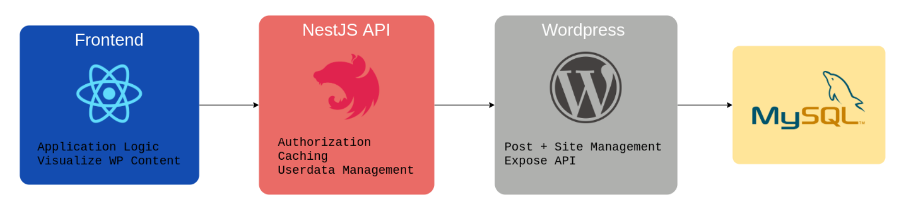
We decided on the following system architecture:
Students see and use a React single page web application (SPA) that displays learning content and lets them manage their learning progress and their account.
All data is provided via an API. Since we decided on a full stack TypeScript approach, we use NestJS here. The API takes care of the authorization and user profile functionality and serves as a cache server for delivering the learning content.
This content is provided by a WordPress instance via API. Teachers use the WordPress admin pages directly to create and update content with the WordPress Gutenberg editor. This gives them a powerful tool to work with and saves us the effort of implementing our own solution.
The clever part is that WordPress is used for what it does best, which is creating content. That lets our API backend take over the rest of the functionality. As a result the WordPress installation is easy to release and maintain, which removes many of the problems you would normally have.
Let us take a closer look at what WordPress looks like at API level. Fortunately a REST API is built into newer versions of WordPress, so you do not need an additional plugin to get started.
Headless WordPress API structure: it all revolves around the "post"
At the heart of the WordPress data structure is a "post". A post can be a classic blog post, but it can also be a static page or, as in our case, custom content. Let us take a closer look at a post via the API. If you want to play around with a local WordPress installation, I recommend using a Docker Compose setup as described here.
If you go to localhost:8080/wp-json/wp/v2/posts, you will see all the posts published on your installation. Alongside title, modification date, author, slug and so on, the post itself is shown as HTML inside the content.rendered attribute.
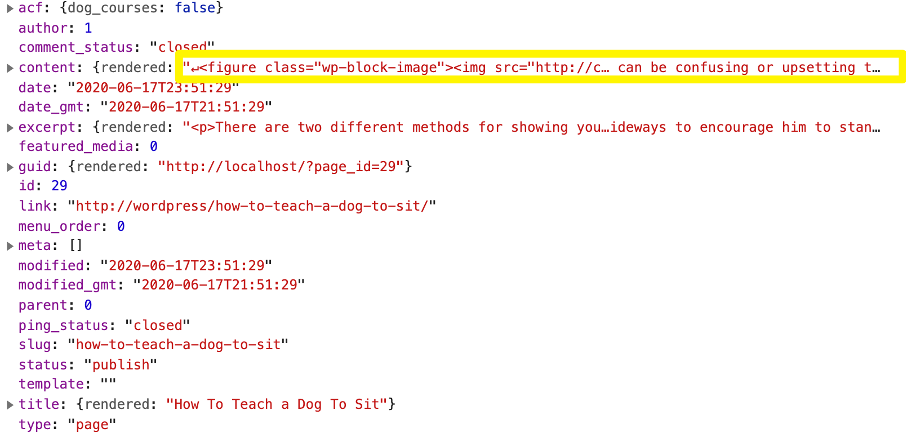
It is important to note that although the API delivers the HTML to you, styling needs particular attention. Normally you would use a WordPress theme to apply a certain style and design to a page. Since we are now using a separate frontend, we have to make sure that appropriate styles for <h1>, <p> and so on are defined in our SPA.
There is a small trick for this:
If you work with the standard Gutenberg editor, you can already create quite a lot of the layout (paragraphs, quotes, two-column layouts and the like). This layout manifests itself as wp-block-* CSS classes in the HTML of your content. To display these attributes correctly, you can simply include the standard block stylesheet generated by WordPress. In our experience there are very few conflicts between this stylesheet and custom styles.
Now we can fetch the content of a post and style it accordingly, which gives us the basic functionality for working with WordPress as a headless CMS. But we are not limited to delivering HTML.
Let us say we want to display not only the learning content but also an appealing information text and a thumbnail image for each course. This is where ACF (Advanced Custom Fields) comes in. ACF lets you specify additional fields and define where they should be attached. That means we can configure WordPress so that authors have to add an information text and a thumbnail to every course. Conveniently, these fields also appear directly in the post API, which makes editing easier.
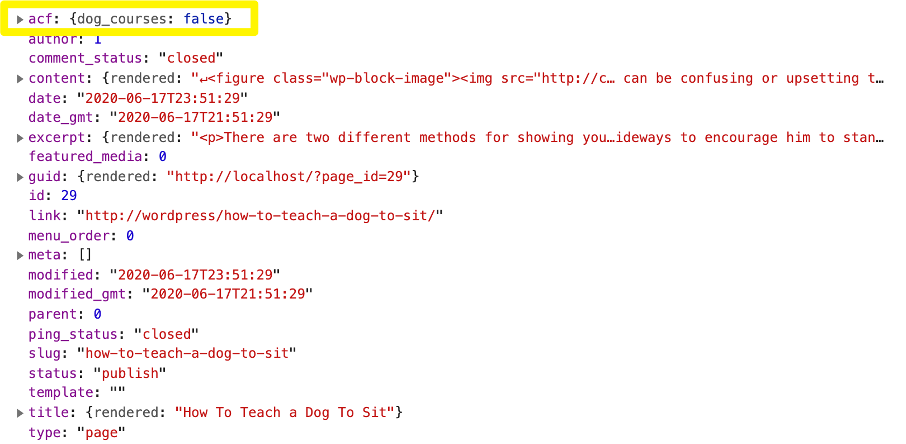
As a result, in our frontend application we only need to look up the field values and can easily use them to build a custom "course preview" React component. With this approach we can extend WordPress so that it becomes an easy to use source of structured content that is consumed by our system.
Considerations on deployment and lifecycle
Finally I would like to say a few words about deploying a system like this. While there is little uncertainty about how the API server and the React SPA are released (we use develop, staging and production environments and process), the lifecycle of our content API for WordPress can be solved in various ways.
One approach would be to provide three headless WordPress instances (dev, staging, prod) and continuously transfer code and configuration by moving database dumps between these three instances.
Depending on your exact use case, however, another approach might be more workable. It consists of having only two instances: a live WordPress instance that is used to provide content for both the staging and the production environment, and a test instance for testing larger WordPress changes. Assuming that content changes do not require frequent WordPress changes, you could use the live instance to deliver live and test content. These can be kept separate, for example by using different post categories within WordPress. The test instance is only used when you need to verify that certain larger changes do not affect the live system. This would greatly reduce the number of database transfers you have to carry out while only slightly increasing the risk to the production system.
Conclusion
This blog post is only the beginning, and of course we have only scratched the surface of what is possible. You can go much further, for example by improving the user experience for editors, starting to build custom blocks for the WordPress Gutenberg editor or beginning to integrate complete page building tools such as Elementor.
„All in all, used correctly, WordPress is a powerful tool that can be part of a modern and efficient development workflow."
It offers a great editing experience for editors (and everyone who creates content), and by combining the API with a headless approach to content delivery you can also build complex applications that win your users over with a good user experience and high quality contenthope this post has given you some ideas for how to start your next content-heavy development project.



Tech Newsletter
Join our 2,000+ subscribers and receive monthly updates on our latest articles, case studies, webinars, events, and industry news.