Processing large volumes of data: how to trim your AI application for high speed


TL;DR
Without any complex special solutions, you can build a high-performance vector database for AI applications with "conventional" PostgreSQL. Specialised vector indexes make sure that queries are answered extremely fast. That saves resources, keeps your AI systems and agents responsive, and minimises operational risk by relying on standard software.
Vektordatenbanken und der Postgres-Ansatz
Modern AI applications, from chatbots through to knowledge base systems, often rely on vector databases in order to recognise contextual similarities between texts quickly. Instead of introducing a separate product such as a vector store as a SaaS or self-hosted solution, however, you can also take this approach with PostgreSQL. Postgres already offers embedded vector data and has proven extremely capable in practice.
A typical structure consists of a table that stores both continuous text and the corresponding vector for each record. That enables the following typical AI workflows:
- The application (a chatbot, for example) submits a search query as a vector.
- Using cosine similarity or other metrics, PostgreSQL calculates which entries in the data set have the highest match in terms of content.
- Relevant documents or excerpts are returned to the AI model in order to generate a well-founded answer.
Why indexes are decisive
As soon as you have several hundred thousand embeddings or more in the database, performance becomes the key factor. In one of our customer projects, for example, there would have been clear performance losses at around 600,000 entries if we had not used suitable indexes.
- Vector index: for vector search (cosine similarity, for example) you need specialised indexes so that the entire table is not scanned every time.
- Several specialised indexes depending on category: with different data categories it usually makes sense to use a separate index per category, in order to narrow down the possible data basis deliberately and reduce response times further.
A practical example: as soon as certain ENUM-based filter criteria are added to the SQL query, such as "content type = event", PostgreSQL decides which index should be used. The clever part: if several vector indexes have been created, the database management system will usually select the most efficient one automatically.
GIN indexes optimise JSON queries and prevent parallel scans
AI applications often work with metadata in the form of JSON objects (document IDs, categories or status fields, for example). When querying, that usually means you want to filter on parts of this JSON object or on its fields. Without an index this leads to what is known as a parallel scan across all records, which means that query time increases drastically at just a few hundred thousand entries.
The solution for efficient JSON queries is the GIN index (generalised inverted index). GIN supports various operators for JSON data, such as the containment operator @> (contains a certain substructure). After we had created an index like that, we were able to reduce the processing time for the same query from several seconds to a few milliseconds.
"EXPLAIN ANALYZE": analyse first, then optimise
Before you configure indexes, though, you should find out where the actual bottleneck lies. This is where the SQL command "EXPLAIN ANALYZE" comes in. It shows you whether an index is being used at all, how many rows are scanned and how long the query takes at each execution step. Two examples to make this clearer:
- Index scan: shows that an existing index is actually being used. Query times are short, because PostgreSQL only reads the relevant records.
- Parallel scan: a warning sign. If the database has to search everything in parallel because no suitable index exists, the runtime rises quickly.
Monitoring in the Cloud
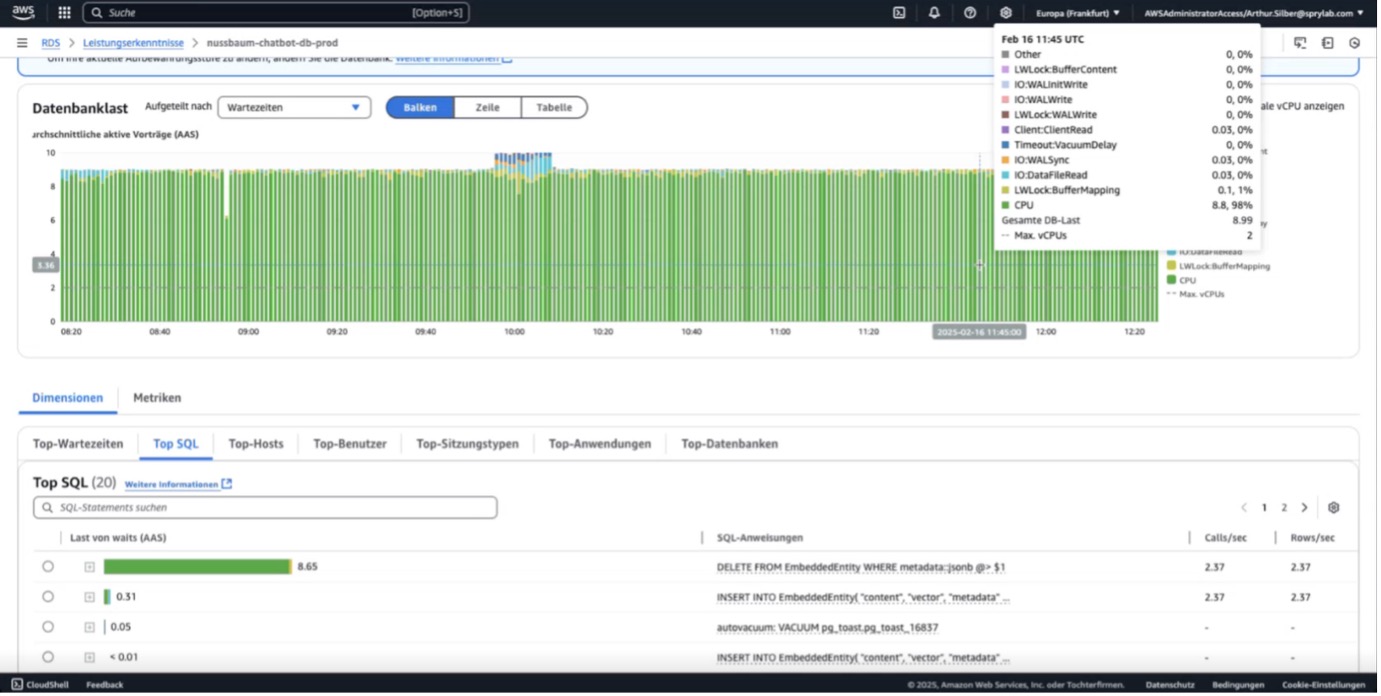
If you run PostgreSQL on AWS or another cloud provider, the dashboard quickly shows you whether CPU utilisation is permanently high or whether you are hitting storage limits. If the metrics point to a bottleneck, you should:
- Identify which queries are causing the load (often it is a few heavy queries).
- Check whether missing indexes or unoptimised operators (JSON contains, for example) are the problem.
- Test your adjustments and measure again with "EXPLAIN ANALYZE" or with cloud monitoring reports.
Conclusion
With specialised (and multiple) vector indexes as well as GIN indexes on JSON data structures, PostgreSQL can be used productively as a vector database. This approach is particularly suitable for you if you already rely on PostgreSQL and have the system under control administratively, because it means you do not have to bring another technology into the house.
If you need support with the design and development of your custom AI solution, visit our AI services page for detailed information and get advice from our experts.



Tech Newsletter
Join our 2,000+ subscribers and receive monthly updates on our latest articles, case studies, webinars, events, and industry news.