More speed, less risk: how Playwright improves end-to-end tests


Manual tests are often time-consuming and error-prone. At SPRYLAB we use the Playwright code generator, a solution that lets us build end-to-end tests (E2E) in next to no time. That saves time and resources and delivers higher quality in our projects. In this blog post I would like to give you a brief look at how we use Playwright.
How automated tests prevent outages and save costs
With reliable E2E tests we avoid costly outages, because we can spot and fix potential errors early. Our customers benefit from being able to bring new digital platforms, apps or AI solutions to market that bit faster and more safely.
Instead of countless manual test cycles, we rely on automation wherever possible. That saves valuable development time, reduces the risk of production errors and supports customer satisfaction.
Behind the scenes: how we use Playwright for E2E tests
Playwright code generator: the booster for our E2E tests
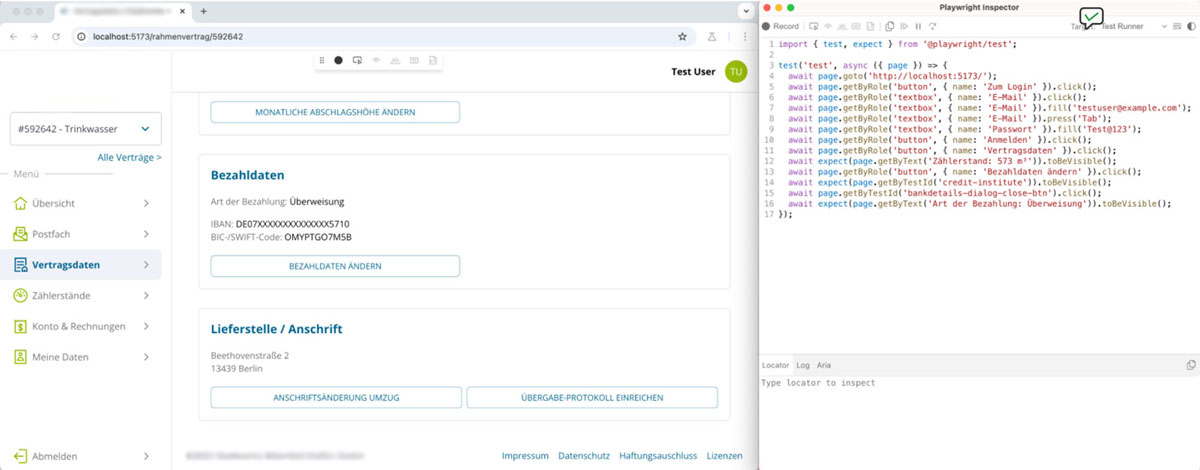
We have been using the Playwright testing framework in our projects for some time now. One big advantage is the built-in code generator: while I click through a sample web application in one window, Playwright writes the test script by itself in the other. In concrete terms that means:
- No lengthy hunting for selectors: the tool automatically recognises data-test-id, labels or text content.
- A quick start for newcomers: anyone not yet familiar with E2E testing has a working framework within a few minutes.
- High maintainability: if the frontend changes, the tests can be updated very quickly thanks to well-chosen selectors (data-test-id, for example).
With large platforms and complex frontends in particular, this massively reduces the effort we spend on manual tests.
Multi-user setup and WebSockets: a practical test for real-time features
The real strength of our E2E tests shows in multi-user scenarios. Teams often want to work together in real time, in an app where two users enter data at the same time for example. With Playwright I simply create two browser contexts in the test ("user A" and "user B") and check:
- Real-time data changes: what happens when user A enters something and user B sees the change immediately? WebSockets are used to test whether data is synchronised and displayed between users without delay.
- Access rights and roles: different user roles (admin and standard user, for example) can be simulated in separate browser contexts, in order to make sure permissions are implemented correctly.
- Error and conflict handling: how does the application respond when several users try to access or edit the same data at the same time? This tests the robustness and integrity of the application under simultaneous user input.
For multi-user applications with real-time interaction in particular, this approach is especially valuable, because it precisely simulates the real behaviour of users acting in parallel.
Strategies for robust selector tests
A question that often comes up in practice is: which selector do I use to target elements reliably? The code generator in Playwright uses a stepwise search to determine the best possible locator. It first prioritises data-test-id, followed by role, text and label attributes. If several elements match, the locator is refined further in order to identify the target element unambiguously.
This method offers several advantages:
- Stability: tests break less often, since they do not depend on specific DOM structures or CSS classes.
- A clear test structure: because uniform selectors are used, the hierarchy stays easy to follow and free of redundancy.
- Readability: semantic locators such as roles or data-test-id make tests easier to understand.
Final assessment
We see every day how well the code generator works, combined with multi-user tests. After a few clicks we have a script that we can adapt and extend. What applies here:
- Working iteratively: we start with simple test flows and refine them step by step.
- Team-friendly: new colleagues get up to speed faster, because they can see directly which elements the tool tests and how.
- Scalability: we can add further browser contexts and cover more complex scenarios without fundamentally rewriting the test concept.
For us the greatest value lies in the fact that we do not only talk about E2E testing in theory, but can simulate real user interaction, including live updates, in faithful detail.
Conclusion
Integrating test-driven approaches early prevents errors before they become expensive. As an agile IT service provider we combine E2E, unit and integration tests in order to give our customers reliable and scalable applications. E2E testing with Playwright not only speeds up innovation, it also improves quality lastingly. With the code generator we create tests efficiently, which supports the development of new features and makes for satisfied users.
Want to talk to us about your software project? Click here to arrange a no-obligation consultation.



Tech Newsletter
Join our 2,000+ subscribers and receive monthly updates on our latest articles, case studies, webinars, events, and industry news.