A GitHub Copilot field report: tips for more efficiency and more fun while coding


The world of AI development technologies has changed a great deal in recent years. Large language models (LLMs), and more recently large multimodal models, along with numerous new tools, open up many possibilities for individual developers, entire teams and companies.
One of the most widely used AI development tools in the world is called GitHub Copilot. It was developed by GitHub and OpenAI with the aim of speeding up the work of developers like me by completing code automatically.
I have been using Copilot myself since April 2022. In this article I will show you some of my tips and tricks, which let me get through repetitive programming tasks considerably faster and increase my efficiency in general. Alongside that, I take a look at the technological approach behind Copilot and at the risks of AI-generated code.
Why I use GitHub Copilot
Copilot was trained on billions of lines of code specifically to support developers with programming. The way it works is very intuitive. Copilot generates autocompletions for a given source code, and it does so independently of programming languages and frameworks. For this, GitHub uses the Codex language model, a variant of GPT-3, which is generalizable enough to understand even domain-specific languages (DSL).
As a developer it is my personal ambition to program as efficiently as possible. Accordingly, I want to automate as much as possible, provided it makes sense. That, after all, is the biggest advantage of Copilot: I have to write less boring repetitive code and can focus more on architecture and business logic instead. That increases how much I enjoy the work and improves my efficiency.
Copilot can also be integrated seamlessly into the most common code editors. I have integrated it into my usual development environment, the JetBrains IntelliJ IDE, via the GitHub Copilot plugin, for example.
Tips and tricks for using it efficiently
To show you what role Copilot plays in my daily work, I would like to say a few words about pair programming. As the name suggests, this technique involves two people programming together. One is the driver, who writes the code at the computer. The other is the passenger, who only looks over their shoulder. The passenger concentrates on the problem and actively supports the driver with suggestions for improvement.
The extra pair of eyes helps avoid mistakes and increases code quality. Knowledge is also shared between the two. What are the disadvantages of pair programming? Two developers are needed at the same time, and on simple tasks the passenger can contribute very little and gets bored.
You have probably guessed it: GitHub markets Copilot as "your AI pair programmer", and that is exactly how it feels. The only difference: instead of a human passenger, there is an AI passenger. In what follows, I would like to use three examples to show you how Copilot performs as my passenger, which best practices I use and which advantages and disadvantages I have observed compared with a human passenger.
1 Passive use
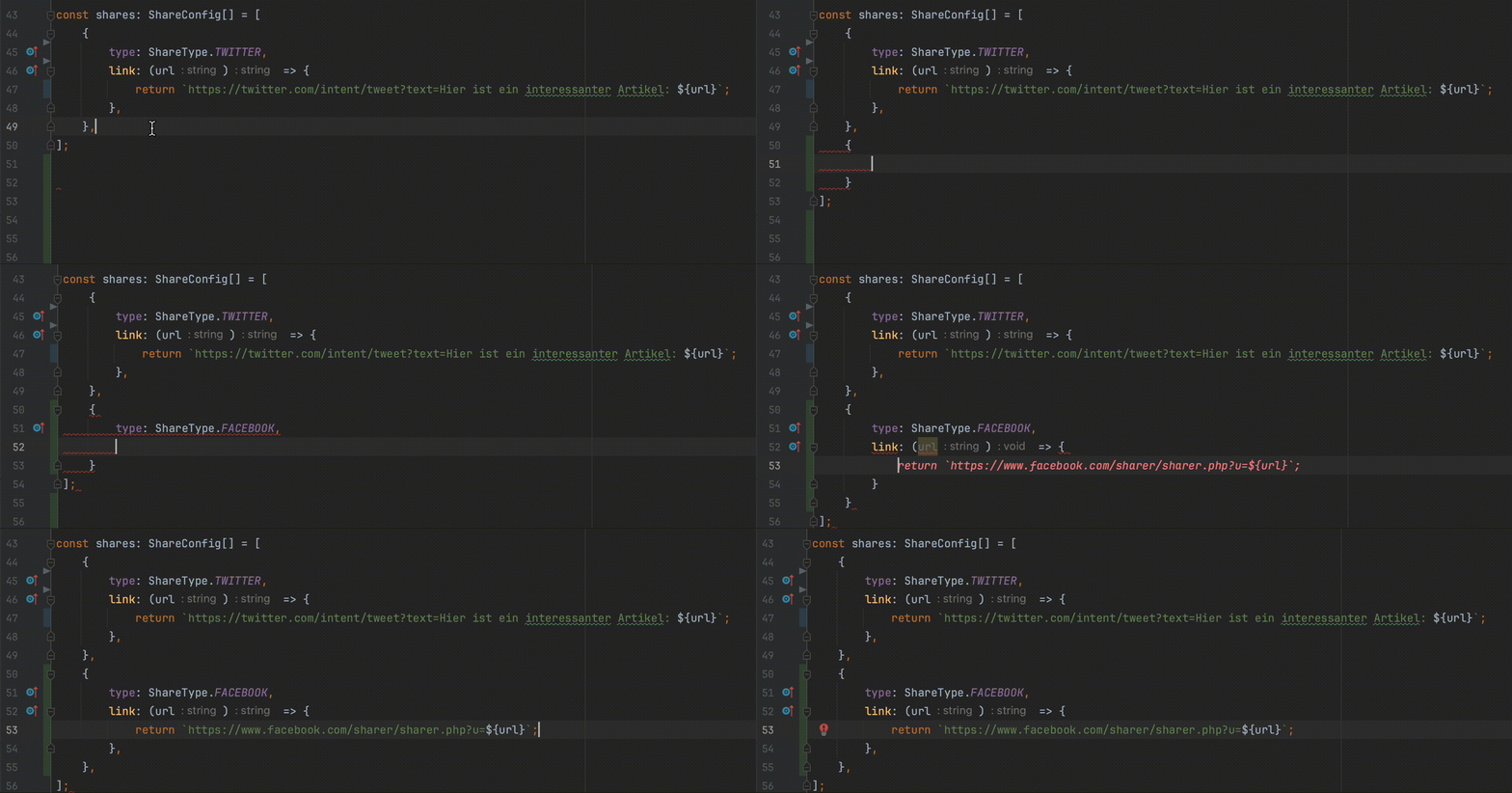
Straight after installation you will notice that autocompletions appear automatically while you program. In this example I am writing a social media share component. I was just about to look up the relevant link for Twitter in the browser when Copilot suggested the right one to me (see the red text in the GIF). I did of course check the suggestion afterwards to make sure the link was correct and, above all, current.
Copilot often knows immediately which state I want to introduce in React, can write the correct regex or even generate entire React components based on a surrounding data model. All of that happens automatically on the side and has helped me write code more efficiently from the first minute. Unlike a human passenger, who can help me too, I can insert individual lines or whole passages with a single keystroke. I am still positively surprised by some suggestions, which not infrequently match exactly the code I was about to write myself.
2 Working with comments
Unlike with a human passenger, we cannot (yet) talk to Copilot. This is where comments come in. They are excellent for telling Copilot what should happen next while you program. A positive side effect: my code is commented automatically and is therefore easier to read, which in turn increases maintainability.

Copilot also helps me comment existing code. That way I can use Copilot as a code comprehension tool when I need to. To do this, I simply start a new comment above a class or method and Copilot explains to me what happens in the code below it. If I like the suggestion, I click accept. In a few clicks, my code becomes easier to understand for me and for my colleagues.
3 Working in a structured way
When I am inside an existing component, for example, there are a great many potential extensions. Without further information, Copilot cannot know what it should suggest. So what information does the tool need in order to make sensible suggestions? It can already do a lot with the name, the input and the output alone. Often it does not need more than that. That means if I structure my code into smaller understandable packages from the start, it can help me considerably better and generate larger and more accurate suggestions.
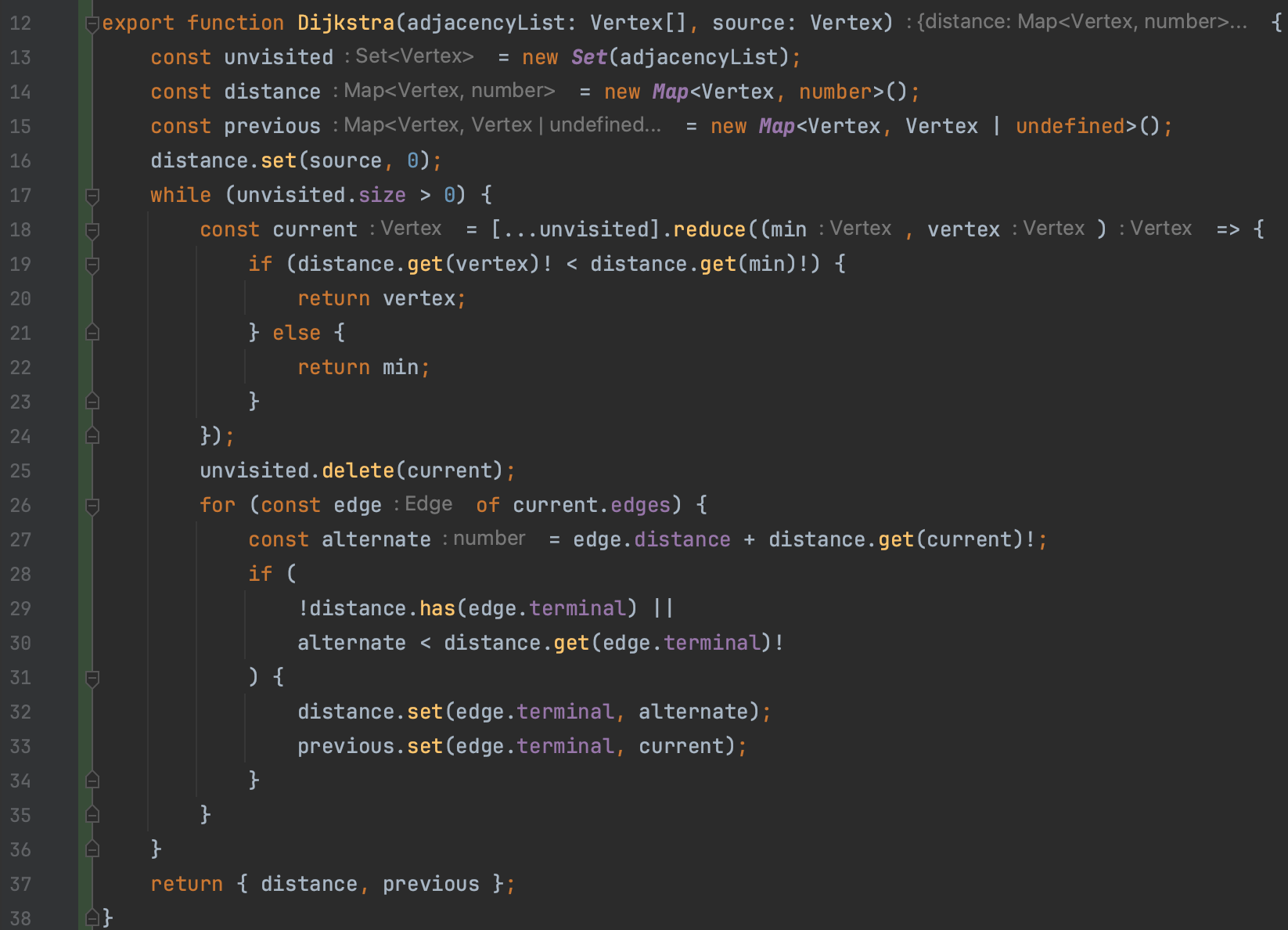
At this point I would like to give an example with the following setup: below you see a class that is meant to implement a Dijkstra algorithm, a common algorithm for finding the shortest paths in a graph. You can also see another feature of the Copilot plugin: for a given spot you can have several larger completions generated and then choose one of them.
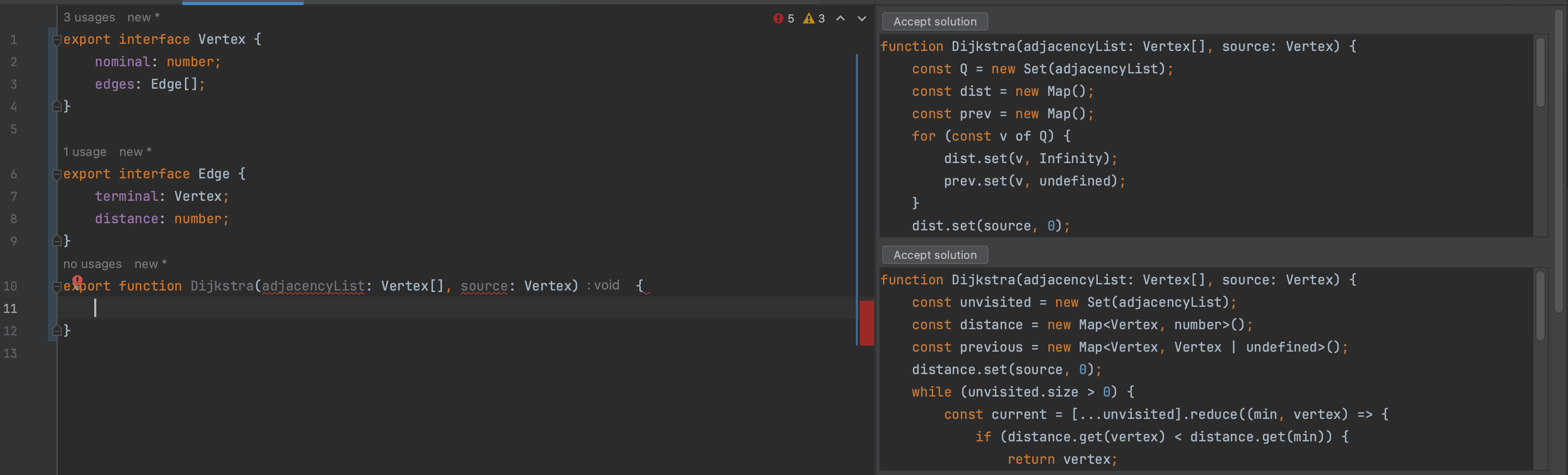
From the interface declarations alone, Copilot understands the format in which the graph is passed, and with the additional information that the method is called Dijkstra, the entire content was filled in with a single keystroke. But is it correct?
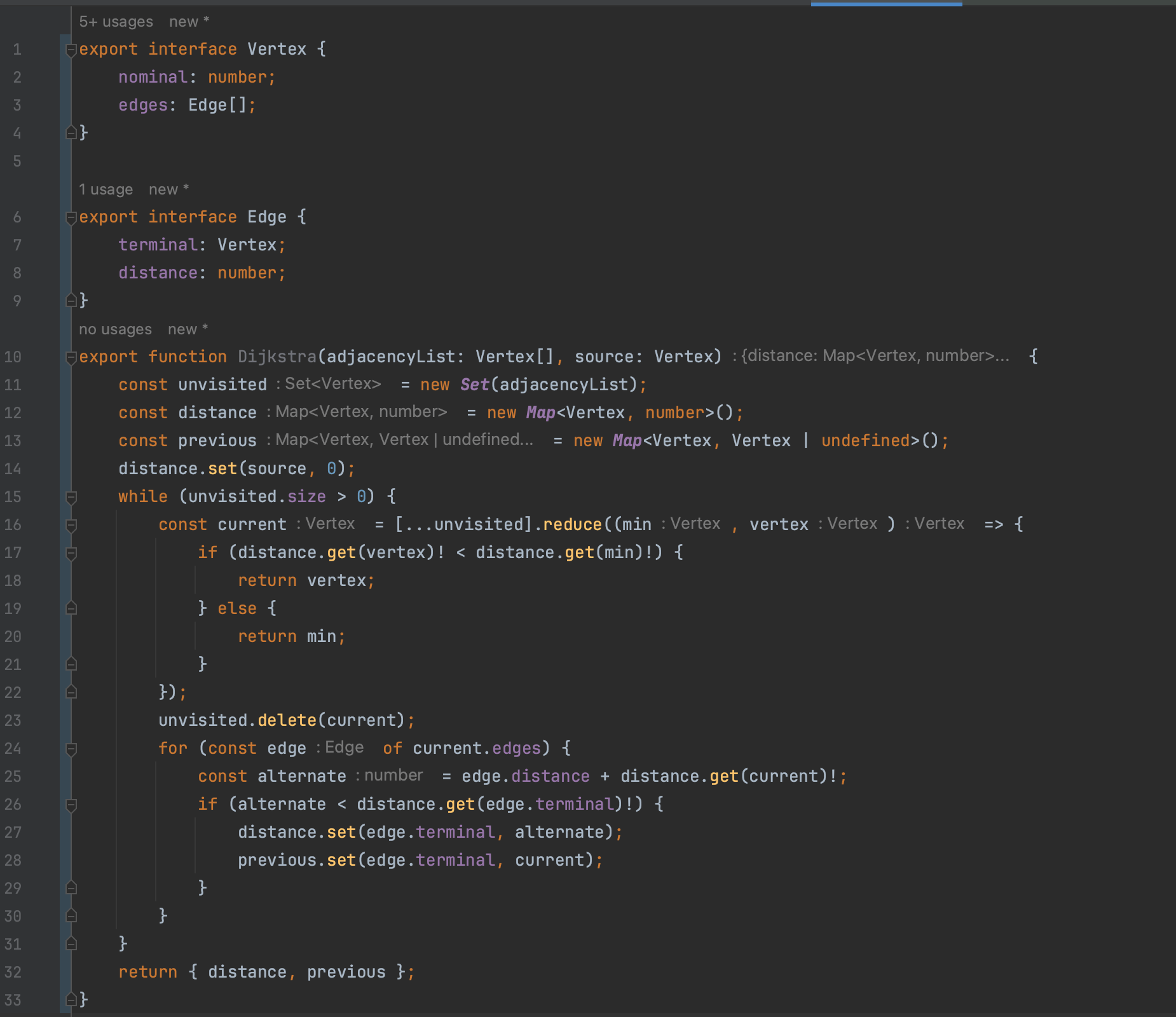
To check that, I can also have a test case generated automatically:
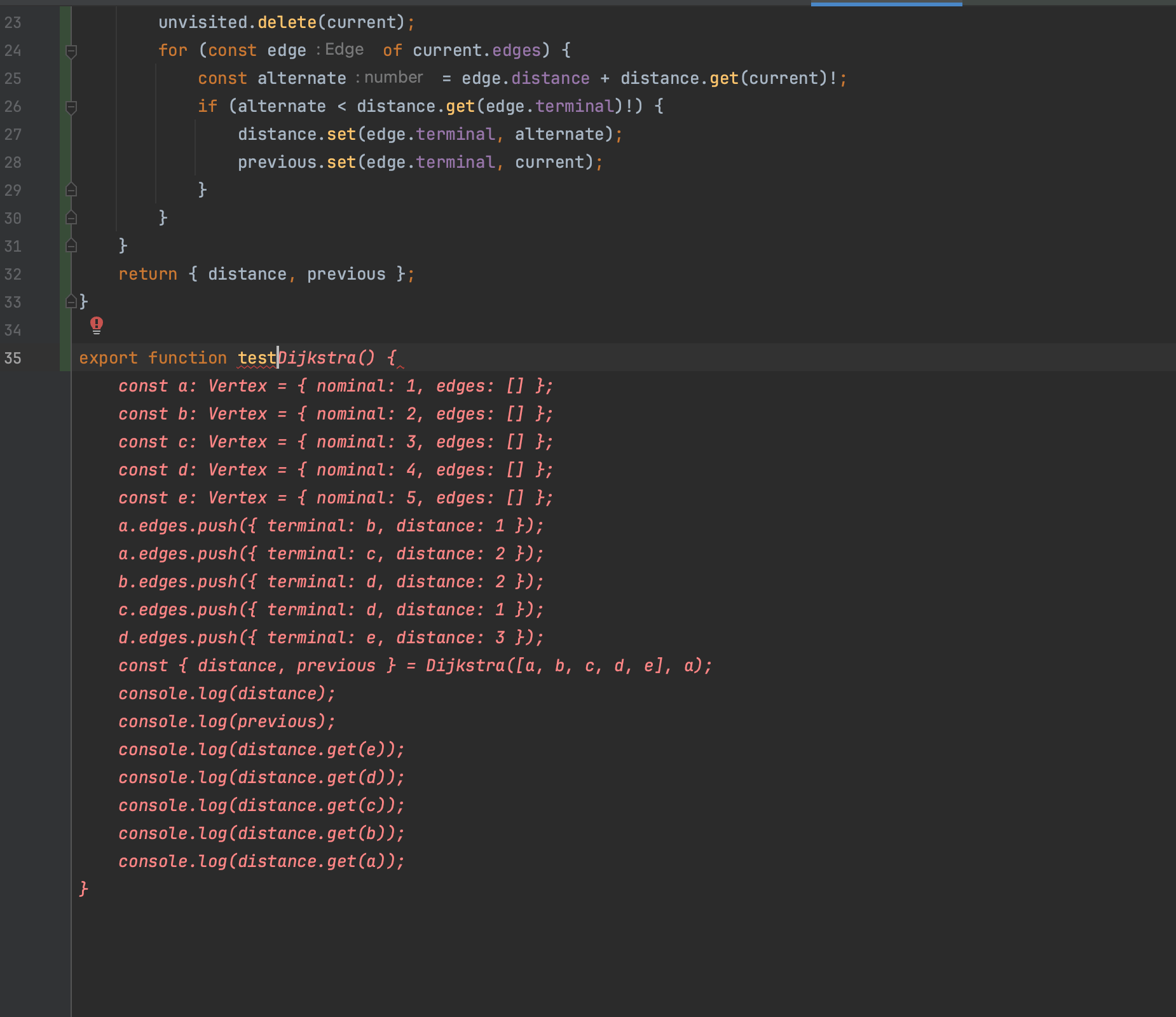
The test (image below) showed that there actually was still a small problem. A condition was missing in line 29. In this example I still had to find that manually, but in the near future, with a chat integrated into the IDE, you might be able to simply write the faulty output into the chat and ask what the problem in the code is.
The example makes clear that the better I structure my code, the better it can be read both by humans and by Copilot. And if Copilot understands my code better, it can in turn support me better.
Risks of AI-generated code with Copilot
The opportunities as well as the risks of AI-generated code are probably obvious to you. Still, I would like to say a few words about three points.
Copyright infringement
To what extent copyright is infringed by the use of Copilot still has to be settled by the courts. Microsoft does, however, now offer a kind of insurance for the event of a legal dispute (the Copilot Copyright Commitment). But it is also clear that almost all developers use various external sources while programming, such as Stack Overflow. And there the risk of copyright infringement is similar to the one with GitHub Copilot. There too I am given suitable suggestions for my problem, and I do not know where they come from or under which licence they were originally created. That is why you should always handle AI suggestions responsibly.
Data protection breaches
Copilot is cloud-based. The service therefore requires constant communication with GitHub's servers. According to GitHub's privacy statement, requests from "Copilot for Business" users are discarded directly after processing and are not used to train the model. As with all closed source services, you obviously cannot see what really happens with your own data. But if you use GitHub purely as a version control platform, you already have to extend that trust to GitHub anyway. Regardless of all this, you should not use sensitive data such as passwords or addresses in plain text in your code in any case.
Security problems
The generated code is not checked in detail by Copilot itself and can therefore contain security vulnerabilities or other errors. Common mistakes are of course also ones Copilot saw more often while learning, which makes them more likely to be suggested. So if you adopt the AI's suggestions without any further measures, security risks can find their way into the code unnoticed by this route as well. The same applies to adopting code from the internet as to suggestions from Copilot: developers should always understand the code and have enough technical understanding to avoid common security vulnerabilities. Even though Copilot replaces a second human pair of eyes during development, that is another reason why a code review by another person should always take place before code is used in production.
Conclusion
Copilot already takes a concrete manual part of my work off my hands today, so that I have more mental capacity for more abstract considerations. So for me, AI programming tools are first of all just tools that support me while programming. Personally, because of the many advantages, I no longer want to work without Copilot.
In the near future I am looking forward to even bigger integrations in my IDE, for example to problems and bugs found by linting or code quality tools being fixed automatically. The automatic generation of commit messages and merge request descriptions, as well as a chat function integrated into the IDE, are also promising extensions that will support programming in the near future through tools such as Copilot X or IntelliJ's AI Assistant.
If you would like to find out more about how we can support you in the field of artificial intelligence, take a look at our AI services page.



Tech Newsletter
Join our 2,000+ subscribers and receive monthly updates on our latest articles, case studies, webinars, events, and industry news.