RAG chatbot: how chatting with your own data transforms business processes

In the digital age, data is the key to your success. To manage it, analyse it and turn it into valuable insight efficiently, your company needs powerful tools. AI-based systems such as RAG chatbots (retrieval augmented generation) and AI assistants let you access data sources with a speed and precision not previously possible. Whether in sales, in support or for preparing knowledge, they offer enormous potential to fundamentally transform your business processes. In this blog post I would like to look more closely at how RAG chatbots and AI assistants work and at the value they add.
How does retrieval augmented generation work?
Retrieval augmented generation, RAG for short, combines the capability of large language models (LLMs) with a search component. A central advantage of this technique is that the LLM itself does not have to be trained extensively and expensively. Instead it accesses external data sources that you define, in order to extract relevant information and include it in the generated answer. RAG chatbots and AI assistants therefore use the language understanding of generative AI while you provide the data basis.
The RAG process can be divided into three steps:
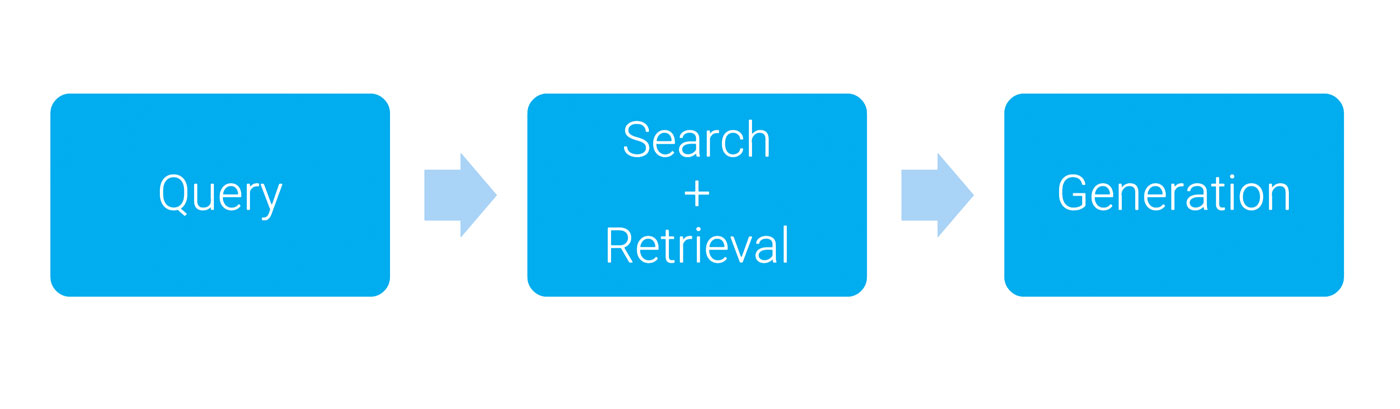
- Query: a request is made in the form of a keyword or a sentence, in order to define the direction of the search.
- Search and retrieval: matching content is searched for in defined sources such as databases or text documents. These can be text documents, OCR-processed images, PDFs, videos or websites. Results are delivered with source references such as quotations and metadata. The search works via classic keyword searches or via vector similarity searches.
- Generation: on the basis of the search results, the RAG chatbot generates a well-founded answer and adds source references. This minimises the risk of hallucinations, where language models deliver false information.
Keyword search versus semantic search in the context of RAG chatbots
Classic keyword search reaches its limits in the context of RAG chatbots. It is based on exact matches of terms and ignores semantic connections. As a result, relevant information is quite often overlooked, because the wording in the search query does not exactly match the wording in the documents, for example. This limitation has a direct effect on the quality of the answers. You can prepare synonyms and spellings manually, but that is laborious and insufficient, because a deep understanding of the context is missing.
Embeddings and vector databases: the key to semantic search
For semantic search, embeddings convert texts into numerical vectors that represent the relationships in meaning between words and sentences. This process is also called tokenization. A search query is likewise converted into a vector, and the vector database identifies content with similar meaning. That lets you find information that is semantically close to the query, even when the exact terms do not match.
Tool usage: how AI tools improve processes
An outstanding feature of RAG chatbots is what is known as tool usage. AI models can carry out external actions, such as creating calendar entries or updating a Confluence page. The language model does not have to be explicitly trained for every tool. A clear description of the tool's function and parameters as part of the prompt is enough to integrate it into the process.
Limits and learnings from RAG chatbots
- Simplified access layer: LLM tools need an accessible access layer in front of the APIs in order to make getting started easier.
- Parameter validation: LLMs do not always use parameters correctly, so validation is essential. Detailed error messages help to correct requests.
- Tool calls: the timing of tool calls cannot be controlled exactly. Irreversible actions should only be carried out with explicit approval; undo functions are helpful.
- Context and access control: it is important to define the context clearly and to handle access rights outside the LLM in order to ensure security.
AI assistants: combining building blocks
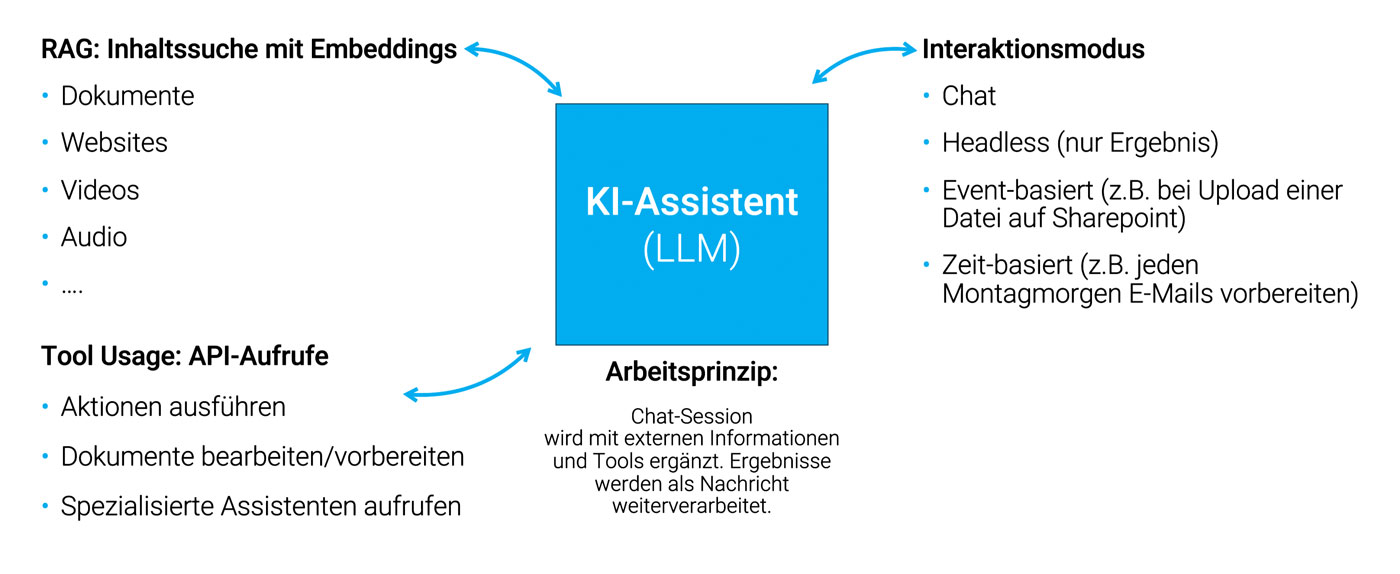
An AI assistant combines technologies such as RAG, tool usage and other interactions. One example is a chatbot that retrieves information, uses tools and generates answers. Assistants like this can work not only in chat mode, though, but also as headless assistants that take on tasks such as automatic report generation without the user having to intervene. An AI assistant could automatically generate reports or process documents every Monday morning, for example, without a person actively stepping in.
Preparing knowledge with RAG
The foundation of a RAG chatbot is a well-structured knowledge base. It is decisive here that documents are prepared so that the AI can process them. This process can be divided into two steps: putting content into text form, and chunking.
- Putting content into text form: texts have to exist in a citable form. With text documents that is easy; with audio or video files you first have to create a transcript. There are already good speech recognition models for this, but under some circumstances you will have to clean the transcript up manually (filler words and so on) to make the text readable. When working with images it can make sense to use OCR (optical character recognition) or image recognition in order to extract the content. If a caption already exists in your sources, that may be enough. PDFs, websites and slide decks can be converted into the simple text format Markdown and worked on further there.
- Chunking: in chunking, longer texts are divided into smaller units, the chunks. The goal is to preserve context even in longer documents while making sure the AI is able to process the content sensibly. That is a challenge when generating an embedding: on the one hand I always want a reference to a specific place in the source material, on the other hand an embedding vector always has the same size (1,500 numbers). A typical chunk covers about one to two paragraphs, or 100 to 200 words, or 500 to 1,000 characters. How fine the chunking process needs to be can vary depending on the document and the context. A chunk that is too large loses semantic detail, a chunk that is too small loses the connection. There is no patent recipe here, it has to be decided, tested and evaluated individually for every project. There are strategies for combining the best of both worlds, though, for example by adding metadata or AI-generated summaries.
From prototype to production system
The road from prototype to a production system is often challenging. Start by choosing the right infrastructure: providers such as MS Azure, AWS and Google Cloud have proven to be solid solutions here. They offer managed services for vector databases and LLM integrations that are GDPR-compliant and allow fast development.
A central point in the implementation is seamless integration into existing systems and processes. You should develop the connector code that mediates between LLMs, databases and internal APIs individually, so that future changes or extensions can be implemented easily. That makes standard components such as language models or vector databases interchangeable, and you do not have to rebuild the whole system. Since AI models are still developing rapidly, you should stay flexible and not commit completely to one provider.
Important features on the way to a production environment
Important supporting features on the way into a production environment are session storage, prevention of misuse, and options for feedback and monitoring. These let you improve the quality of your system in the long term.
- Session storage: you should be able to save RAG chatbot sessions in order to call them up or review them later. This is important for monitoring and quality assurance.
- Preventing misuse: authenticate your users in order to prevent misuse and overload. That also lets you implement rate limiting more effectively, since rate limiting blocks unwanted users or bots that overuse or abuse websites. And depending on how exposed your tool is, you will have to think about attacks on your language model such as prompt injections and topic derailment, where your bot is used to produce swear words.
- Feedback and monitoring: user feedback, via thumbs up and thumbs down for example, helps improve the quality of your system. That gives you a first satisfaction metric easily and quickly, without having to go into the individual conversations
Do you have first RAG or AI ideas in mind but are not sure whether they make sense or are feasible? Request an AI workshop now.
Concrete use cases for RAG chatbots and AI assistants
Retrieval augmented generation (RAG) chatbots and AI assistants open up numerous fields of application in various parts of a business. I would like to look at three use cases more closely.
1 Supporting sales with RAG chatbots
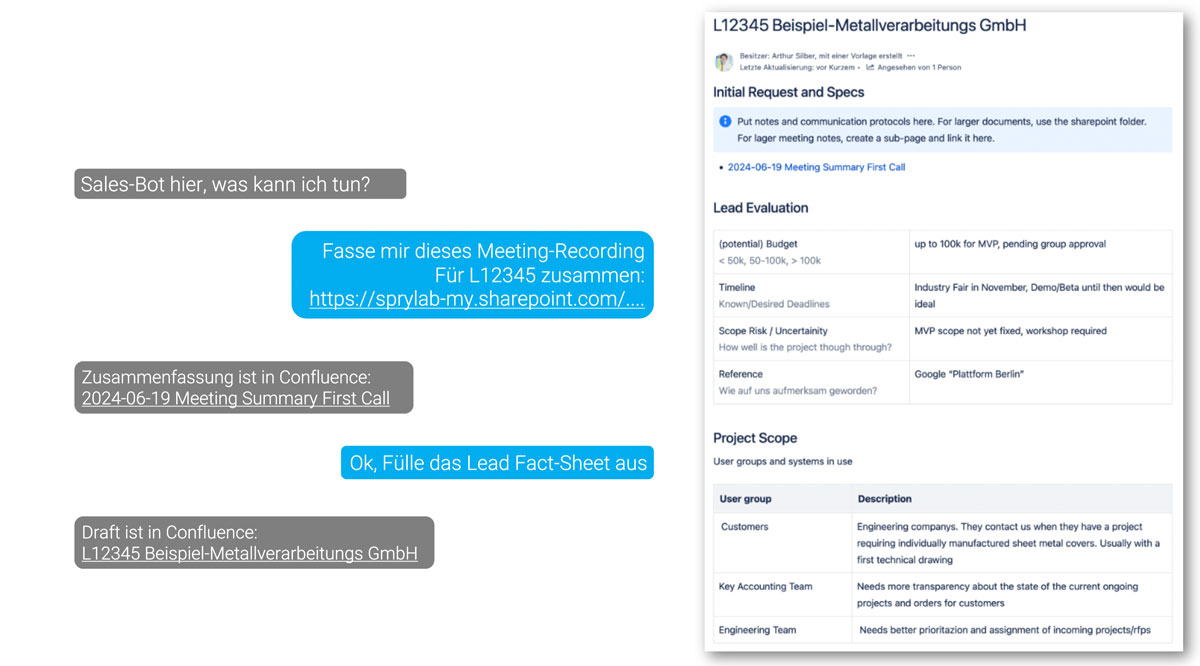
A particularly practical use case for RAG chatbots in companies is supporting sales processes. They can automate sales processes, for example by documenting consultations with your customers, tracking leads and creating fact sheets. This is especially helpful for capturing information consistently and in a structured way, regardless of which programs or tools are used in your company.
Key facts:
- Interaction: integrated as an MS Teams chatbot, in which the conversation partner is identified directly.
- LLM: GPT-4 Turbo via MS Azure
- Connected services: SharePoint file transfer, Confluence, Whisper
- System architecture: a master assistant leads the chat conversation, while specialised sub-assistants take on individual tasks. This works through a combination of prompt chains and custom code.
Important considerations: when implementing a sales RAG chatbot, you should standardise the underlying process. The more automation and support an AI assistant provides, the more the workflows have to be formalised and documented. That makes sure the chatbot responds consistently and appropriately in different situations. Store interim results in tools such as Confluence in order to allow human review and correction. This hybrid way of working makes it easier for you to add smaller corrections and ensures a smooth workflow. Finally, data protection and compliance have to be considered, especially when meetings are recorded. Inform the participants in advance and plan the retention period and the use of transcripts. More on this under AI consulting.
2 Researching and preparing technical data
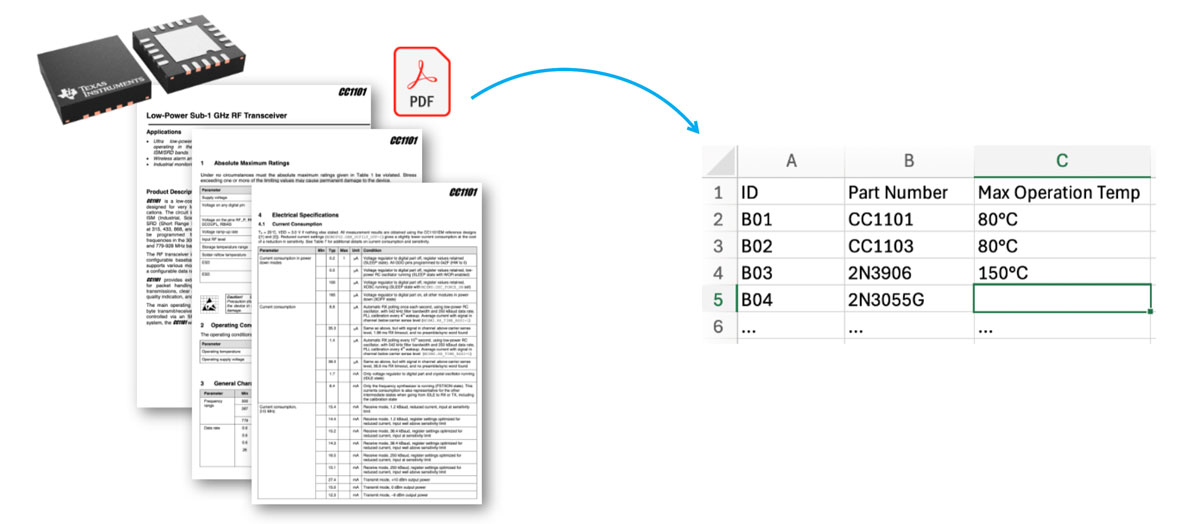
RAG chatbots can be used excellently for automated data research and preparation, in mechanical engineering for example. Technical data or key figures from a wide range of sources such as documents or databases are extracted and prepared automatically. This not only saves valuable time but also lets your staff concentrate on more demanding tasks.
Key facts:
- Interaction: headless (executed on call)
- RAG pipeline: text is extracted from PDF documents using the tool "unstructured" and the data is temporarily stored in an in-memory vector database.
- System architecture: input is file-based (data sheets, for example) or via import and export of data as CSV. If the PDF quality is poor, using OCR can be necessary in order to capture the text correctly.
Important considerations: check the quality of the extracted data by hand, especially where the data is critical. Checking is still faster than processing the data entirely manually. In any case, implement an approval process, because ultimately the responsibility lies with a person.
3 Internal and external first-level support
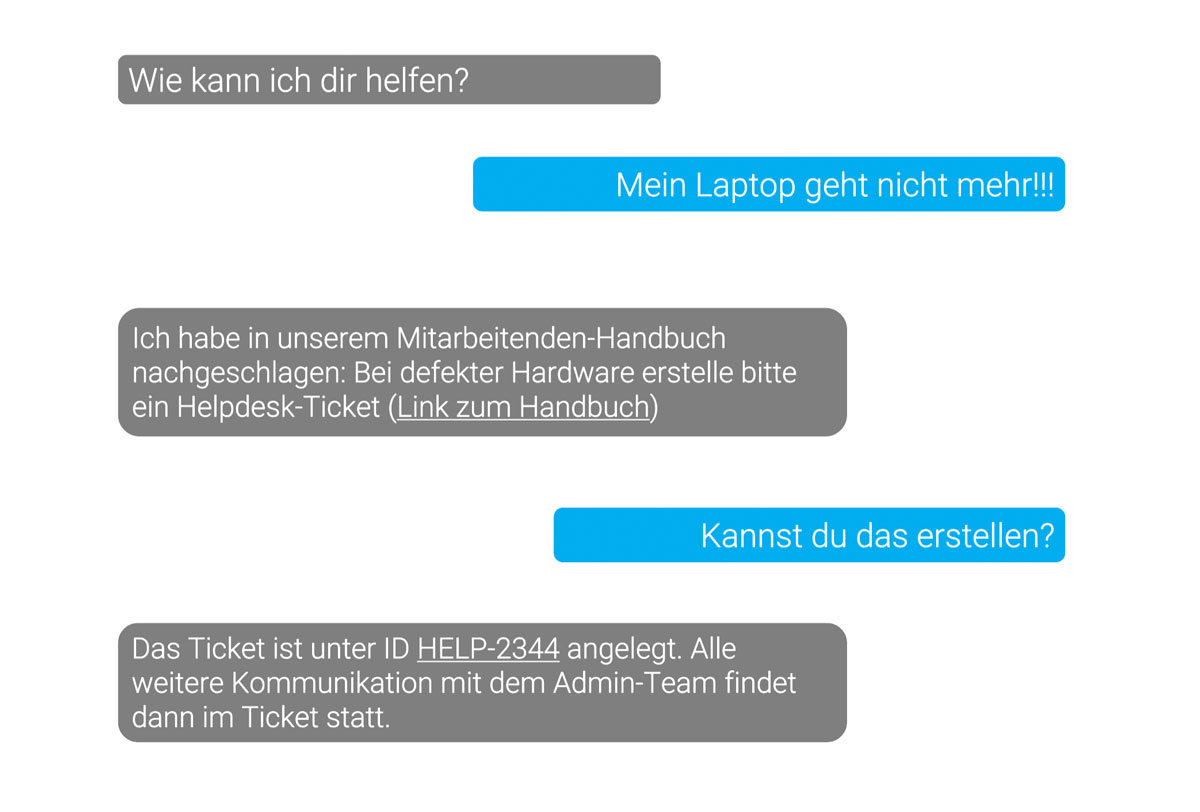
RAG chatbots also prove extremely useful in support. They can answer frequently asked questions automatically and thereby take pressure off first-level support. That gives your support team more time for more complex matters, while your customers get answers to their questions faster.
Key facts:
- Interaction: MS Teams chatbot
- LLM: GPT-4o via MS Azure
- RAG pipeline: keyword-based search on an external website via API connection (a vector database is not yet necessary)
- System architecture: lightweight, no persistent message store, conversations end automatically after five minutes
Important considerations: an essential aspect of using RAG chatbots in support is how your users behave. While simple enquiries such as solving everyday software problems are covered well, the added value is greater with deeper technical questions. It is decisive here that the relevant documentation exists for the chatbot to point to.
These examples make clear how versatile RAG chatbots and AI assistants can be in digitalizing and improving your business processes, taking pressure off staff and increasing efficiency.
How can you get started yourself?
OpenAI's ChatGPT now has RAG functionality, which means you can upload selected files of your own. Test with your documents how far ChatGPT delivers correct answers. On ChatGPT you can now even create custom GPTs. These allow tool usage and calls to custom APIs. That is ideal for prototyping, since you can share and test them with your team.
During prototyping it can happen that you have to carry out certain actions manually yourself. The interaction and integration will also still feel bumpy, and some APIs will not exist for mapping one of your desired processes satisfactorily. Even so, by testing and building a prototype you may have identified potential for improving a process in your company, and the next step should be to move into custom development.
Conclusion
RAG chatbots and AI assistants offer an innovative opportunity to change how your company handles data for good. Thanks to intelligent search processes, seamless tool integrations and an intuitive user experience, you can automate your processes, increase your productivity and use your resources more efficiently overall.
To get started, I recommend testing simple use cases first, with ChatGPT and its RAG functionality for example. On that basis you can then have tailored solutions developed and integrate them into your workflows. Whether in sales, support automation or efficient document processing, your options are varied.
If you would like to find out more about our AI services and approaches, click here.
FAQ: frequently asked questions about RAG chatbots
1. What is a RAG chatbot?
A RAG chatbot (retrieval augmented generation chatbot) is an AI-supported bot that generates answers to user queries by combining two processes: information retrieval (fetching relevant data from a knowledge base) and text generation. Unlike conventional chatbots, which depend on predefined answers or simple rule sets, a RAG chatbot searches extensive data sources such as internal company documents or databases and delivers precise answers in real time using natural language processing (NLP). This gives you an individual, data-based answer to complex questions.
2. Why is retrieval augmented generation important?
Retrieval augmented generation (RAG) is important because it overcomes the limits of conventional chatbot technology. RAG combines the retrieval of specific, relevant information from an extensive knowledge base with the ability to formulate human-like answers. That way the chatbot can do more than give general, prepared answers; it can draw on real-time data and the specific context of a query. This is particularly important in areas such as customer service, sales and IT support, where tailored, data-based answers can make the difference between a successful interaction and frustration. RAG chatbots are already being used in various fields, including educational software, where they improve knowledge transfer through personalised and interactive learning content.
3. What advantages does a RAG chatbot offer my company?
A RAG chatbot offers numerous advantages for your company:
Greater efficiency: complex customer enquiries can be answered faster and more precisely, which reduces handling time.
Better customer care: the chatbot delivers context-based and personalised answers, which increases your customers' satisfaction and loyalty.
Improved internal processes: your staff can access information from internal data sources quickly, which speeds up decision-making and breaks down knowledge silos.
Lower costs: using a retrieval augmented generation chatbot can reduce your need for human labour in customer support or the help desk without affecting the quality of the answers.
Scalability: the RAG chatbot can handle many of your enquiries simultaneously, which is particularly useful at times of high volume.
4. How does a RAG chatbot differ from a conventional chatbot?
The essential difference between a RAG chatbot and a conventional chatbot lies in how each processes information. Conventional chatbots are often based on rule-based systems or prepared answers and are therefore heavily limited in their flexibility. They can handle simple queries efficiently, but quickly reach their limits with complex or unexpected questions.
RAG chatbots, by contrast, use a combination of machine learning and the ability to retrieve information from various data sources in real time. This means they can access a wide range of current and relevant information and formulate it dynamically in understandable, natural language. Unlike conventional chatbots, which often rest on rigid, predefined dialogues, RAG chatbots are considerably more adaptable and able to answer even complex questions with tailored responses.
5. Which data sources can be integrated into a RAG chatbot?
A RAG chatbot can access a wide range of data sources, including:
Internal documents and databases: company policies, training documents, manuals, technical specifications and so on.
Content management systems: product descriptions, instructions and support articles.
Cloud storage: information from company clouds such as Google Drive, OneDrive or AWS.
Customer relationship management: data on customer transactions, support requests and contact history from your CRM and customer portal.
ERP systems: information on orders, supply chains and inventory.
External APIs and databases: if desired, the chatbot can also access external data sources such as weather data, stock market information or publicly available scientific data.
The integration depends on the company's specific requirements.
6. Is a RAG chatbot secure when handling sensitive company data?
Yes, RAG chatbots can be designed to be secure when handling sensitive company data. Implementing encryption protocols, role-based access controls and secure interfaces (APIs) makes sure that confidential information is not made accessible to unauthorised third parties. Mechanisms for anonymising data are also often used, to make sure that personal or sensitive data is only processed where necessary. Regular security audits and compliance with data protection rules such as the GDPR (in Europe) are likewise essential for secure operation.
7. How long does implementing a RAG chatbot take?
Development times for a retrieval augmented generation chatbot vary according to our customers' individual requirements. Unlike standardised solutions, we do not offer one-size-fits-all implementations but develop the chatbot specifically tailored to your business processes and needs. The whole process, from requirements analysis through development to implementation, can take between 4 and 16 weeks, depending on the complexity of the project and the integration into existing systems. Here is an overview of the most important steps:
Requirements analysis and design: together with you we work out a detailed needs analysis, in order to define the requirements and goals of the RAG chatbot precisely.
Data preparation and integration: preparing and integrating the relevant data sources is a central part of the work, since we make sure the chatbot has access to the information it needs.
Individual model development and adaptation: instead of off-the-shelf models, we as a software development agency build an AI model that is trained on your specific data and requirements. This can also include training with your company's own documents and databases.
Testing and optimisation: before going live, the chatbot is tested intensively to make sure it works correctly and efficiently. Adjustments and improvements are based on test runs with real scenarios from your day-to-day business.
Training and support: after implementation we offer you and your team comprehensive training, so that the chatbot can be used and maintained to best effect. We are also available for support and future updates.
8. How do I maintain and update a RAG chatbot's knowledge base?
Maintaining and updating a RAG chatbot's knowledge base happens continuously, in order to make sure the information provided is always current and correct. This includes regularly adding new data sources, such as updated policies or new product information, so that the chatbot can always access the latest data. It is important to review existing content regularly in order to remove or adjust outdated or inaccurate information.
Beyond that it can make sense to retrain the underlying model regularly, particularly when the nature of the queries or the company's data landscape changes. User feedback also plays a decisive role, since it helps improve the chatbot's performance continuously. By paying attention to queries that were not answered well, targeted adjustments can be made to the knowledge base in order to keep increasing the accuracy and relevance of the answers.


Tech Newsletter
Join our 2,000+ subscribers and receive monthly updates on our latest articles, case studies, webinars, events, and industry news.